Background
I joined the Messenger Kids team in 2019, shortly after launch, as a contract designer on a team split across growth, retention, and art (content-for-kids) tracks. The app was brand new, which meant a lot of growing-pain realizations early on.
The kids' experience was the selling point, but all of it depended on the parent doing the setup work (adding friends, approving connections, setting time limits, reviewing flagged messages). My first project was co-parenting, a feature the team needed done quickly.

Discovery
During a qualitative research session, we surfaced a gap in how parents understood their child's account. They were used to making accounts on the internet and assumed their child's would work the same way. It didn't. A child's Messenger Kids account is controlled and managed through the parent's own Facebook account, so parents needed a new mental model for sub-accounts.
Co-parenting was the clear first need, so I started there. I added a step to onboarding where the first parent, who holds full admin rights, can invite a co-parent. Security came first, so a co-parent can't request access on their own. I worked with the art team on custom illustration and built to Facebook's design standards so it felt native to the platform. We shipped v1.
Shipping it showed how thin the parent controls were. Everything lived in a single feed (notifications, friend requests, settings, and now co-parent management), and it was buried in Facebook's menu. We realized the harder we made that for parents, the worse the app got for kids. How do we keep this manageable for busy parents, with more features on the way?
Challenges & Opportunities
Challenges
- Facebook's design system had no components for a parent managing a child's profile
- Parents weren't necessarily aware admin rights existed or how to manage them. We needed controls that were easy to digest and quick to set up
Opportunities
- This was new ground. A parent-managed account for a child under 13 wasn't an established pattern yet, so there was no legacy to design around
- Messenger Kids was its own product, so I had room to build custom UI based on Facebook's profile structure, even where no components existed
Ideation
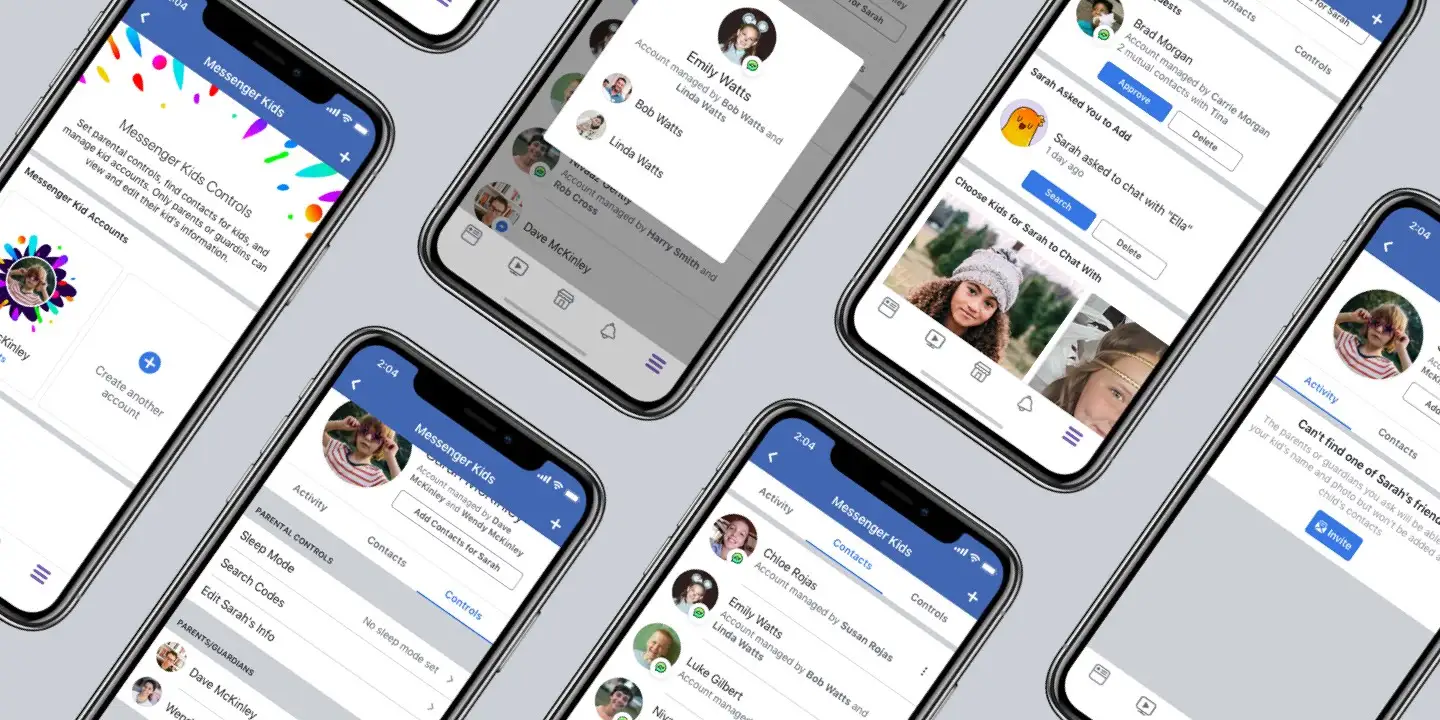
The UX answer was clear. Three kinds of information were competing in one feed, so I gave each its own space with tabs:
- Overview: a feed to approve friend requests and manage notifications
- Friends List: view and find connections for your kid
- Parental Controls: a single space for every setting, including co-parenting
The harder part was building it inside Facebook's design system. Because Messenger Kids was its own product, the profile structure was custom UI based on Facebook's profile patterns, not available components. That let me build a dashboard that scaled with the app's roadmap and still felt native to Facebook.
Results
What shipped
- A co-parenting flow in onboarding, shipped as v1
- A full overhaul of the Parent Portal, restructured into the three-tab system, with co-parenting controls built in
Results
We tracked friending activity and how many parents engaged with the redesigned controls after launch. 80% of parents who opened the dashboard opened all three tabs, and friending rose 4%.